Before you press Activate
Check your account’s reward, year and exact expiry. Inspect the current shop: a 14-day window does not make unavailable offers return. Use the 14-day activation example to compare announced arrivals and offer end dates.
Pirate Shop access is reported as non-transferable. This guide cannot inspect your inventory or activate a reward. Never enter your Epic password into a third-party “claim token” form.
Protect your account: Enable two-factor authentication through Epic. Pirate Shop access stays with the receiving account. Avoid token sellers, generators, paid activation offers and messages that send you to a web claim form. Claim inside Fortnite, and keep your password and verification codes private.
Paid carries, AFK tools and account listings
Dexerto reported paid carries, automated farming advertisements and an account listed at about $10,000 on November 3. A listing is not a completed sale or a transferable Token. Paying a carry cannot guarantee Pirate Shop access. Avoid unknown AFK software and exploit offers. Epic prohibits buying, selling and sharing accounts; keep your password and verification codes private. Keep to normal play rather than services that ask you to cheat or share an account.
The viral compass is not a verified shortcut
Esports.gg identifies TikTok videos promising a Pirate Shop Token compass as clickbait. Do not follow “dev hours”, map codes or outside login prompts as a Token claim method. Its report also reproduces FortniteStatus’s warning about account purchases and fake tools. This does not mean a legitimate chest-revealing Sprite is fake: locating chests differs from locating a guaranteed Token.
If Chopper is your priority, check the live offer and your remaining Sidekick allowance before you activate Pirate Shop access. Reported terms allow one free Sidekick you do not already own. Save that choice until you can inspect Chopper’s claim confirmation.
Reference: Dexerto · Epic Games · Dexerto · esports.gg
The reported in-game activation path
Return to the lobby
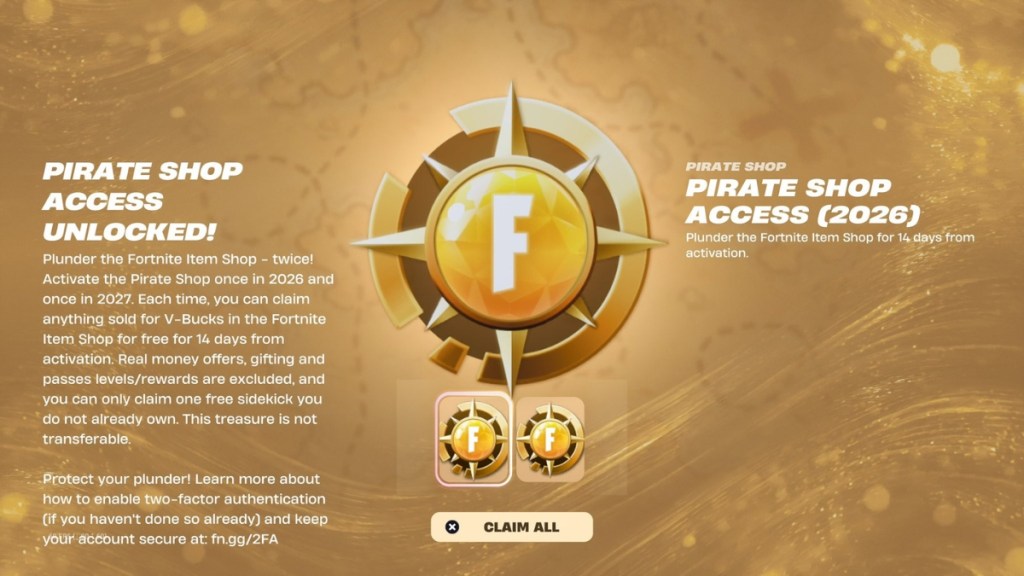
If the reward message shows “Claim All”, use it to add the reported entitlements to your account and check the years listed. This lobby step does not start Pirate Shop access.
Open the Item Shop
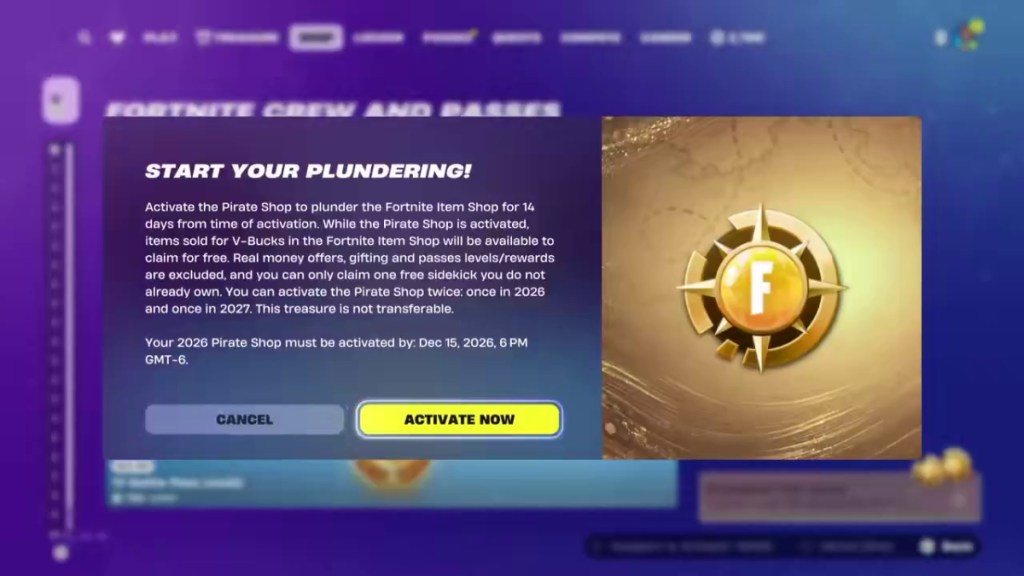
Look for “Plunder the Item Shop”, the English label shown in published captures. Its position and wording may vary by platform, language or update.
Read and confirm
Check the year and exact deadline on the confirmation screen. Choose “Activate Now” when ready to start the 14-day period of Pirate Shop access.
Claim eligible offers
Check the end timer on the Plundering badge and look for offers marked “FREE”. Claim each eligible offer while it is available and verify it in your Locker.
Estimate when your access will end
Plan your 14 days
Enter the time you expect to press Activate. This calculates duration; the deadline in your game decides eligibility.
This is a duration calculation, not a token check or a guaranteed deadline.
If the entry is missing
Confirm you received Pirate Shop access rather than another reward. Check its year: a 2027 entitlement is not a November 2026 activation.
Players cited by Timesaver describe keeping the reward after elimination; if you saw the banner, check the lobby after the match.
A discovery banner is not confirmation that access reached the account
A player report checked on November 4 describes a banner without Pirate Shop access appearing in the lobby. It is an individual report, not an Epic-confirmed widespread fault or published fix.
- Confirm the same Epic account and inspect the lobby reward notice and Item Shop entry.
- Save the banner, replay if available, match time and platform before trying basic troubleshooting.
- You may reopen Fortnite to check whether the interface refreshes. This does not guarantee restored Pirate Shop access; reinstalling is not a verified fix.
- Check Epic service status and contact Epic Player Support privately if access remains missing.
Do not give login details to a “reward recovery” service. The activation entry may move; use its label and confirmation screen rather than a fixed bottom-left or bottom-right position.
Reference: VICE · Timesaver · Reddit · ClaimCodes
Pirate Shop access questions
Does finding the reward start the clock?
Reports distinguish receiving Pirate Shop access from activating it. Read your confirmation screen.
Does this planner activate anything?
No. It adds 14 days to a time you enter; only Fortnite activates the reward.
Are future offers delivered automatically?
No. Claim eligible items while they are available and your access is active.
Sources & evidence
These guides draw on reporting and in-game captures. Your current in-game reward screen takes priority.
- esports.gg · Viral compass warning · report
- Beebom · In-game screen captures · screens
- Dexerto · Reward rules & player reports · report
- VICE · Match and Item Shop captures · screens
- Unplayed · Lobby claim and activation report · report
- Epic Games · Account security · official
- Timesaver · Shop capture and deadline analysis · report
- Dexerto · Paid carries and account listings · report
- Reddit · Individual missing-reward report · community
- ClaimCodes · Reported activation and offer dates · report